
Dynamic Sharpness
-
Dynamic Sharpness
FlipCloc dynamically changes the resolution of the canvas when screen size is smaller to keep FlipCloc sharp at very small sizes while keeping GPU usage optimized by not exceeding a maximum pixel count -
Clock UI Disabled Button Behaviour
UI buttons incompatible with your current settings are now disabled and dimmed rather than completely hidden. This ensures you always know what options are available while preventing the menu from shifting or resizing when toggling features. Hover descriptions let you know why a feature is currently disabled.
This approach creates a much more stable navigation experience. Related settings, such as 'Seconds' and 'Continuous', '60 FPS' and 'FPS', or 'Screen Alerts' and 'Screen Flashes' can now remain neatly grouped together without the interface bouncing around.
(Left: Before, Right: After)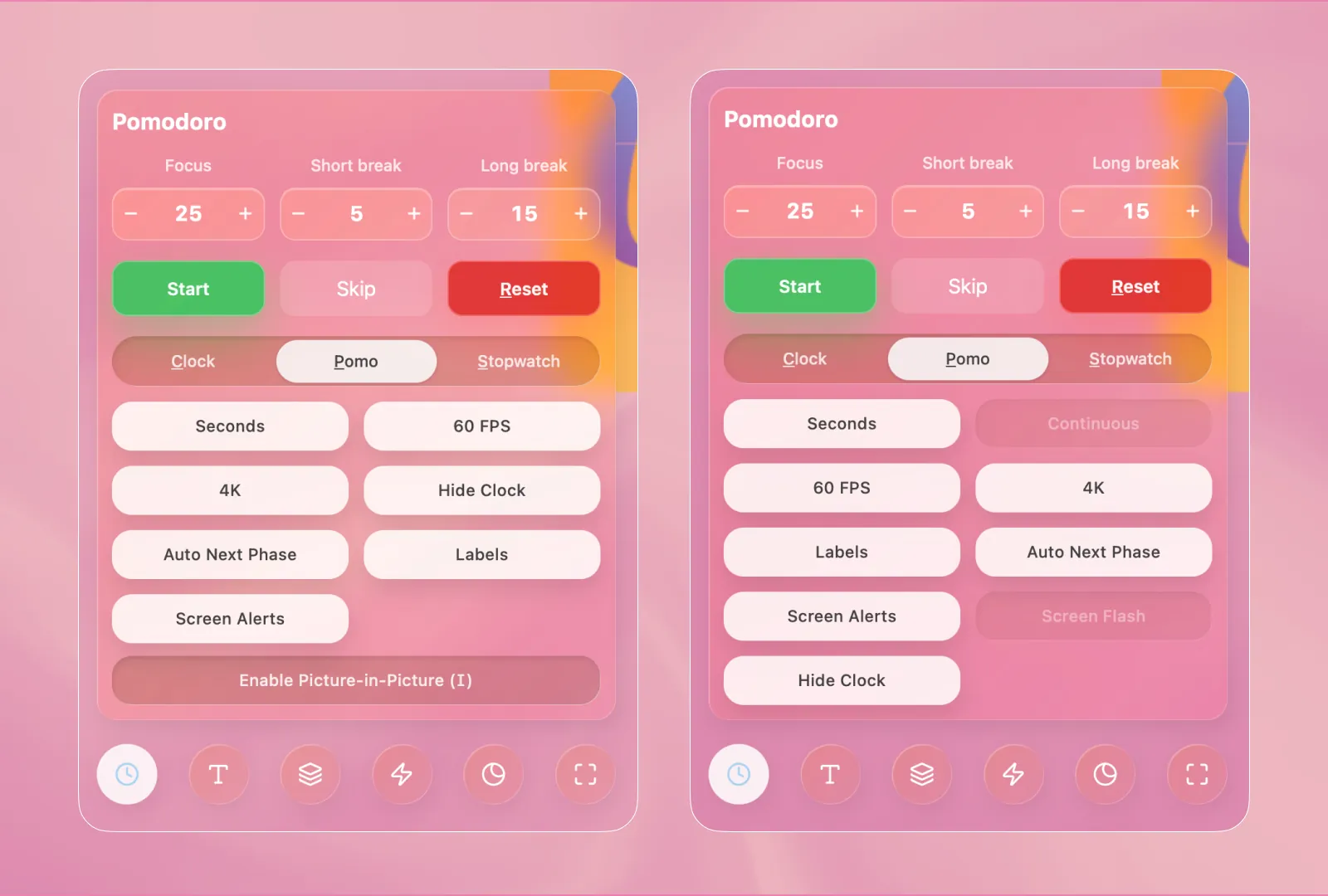
-
Menu Hover Effects
Refined, smoother hover animation for the menu that animates the icon and circular background in sync -
Resources Pages
Added new resource pages to help people get upto speed with a flip clock, the pomodoro technique, and how a flip clock is useful for productivity